
You can use Google Analytics 4 (GA4) to find out where your readers come from and what they read on your blog.
In this article, I will discuss how to check blog traffic on google analytics 4. As you know, we provide 3schools Make Story for Blogger with a blogger template. So, you can follow this article to add Google Analytics to your blogger account.
Find your Google Analytics measurement id
To find your Google Analytics measurement id , do the following:
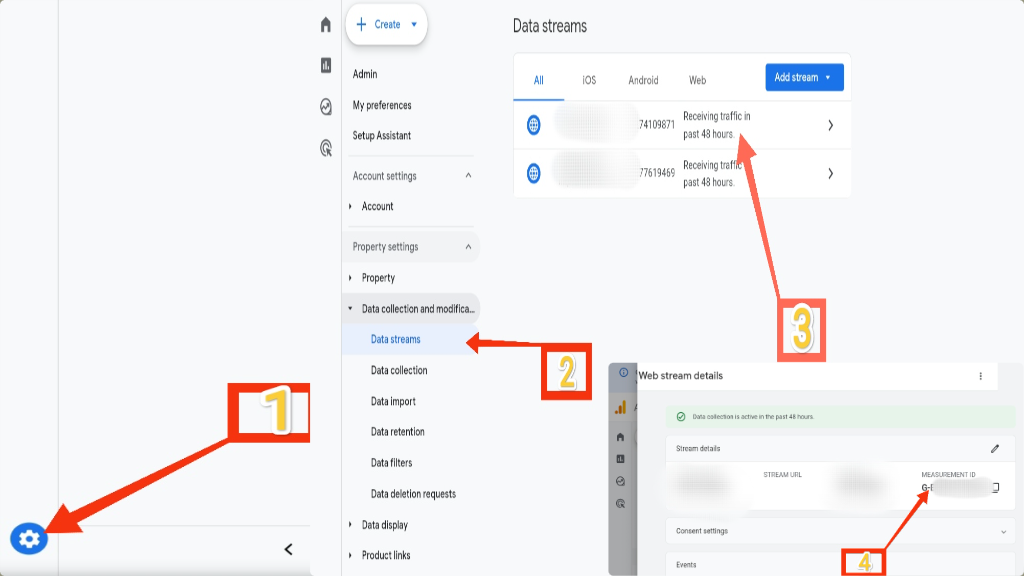
- Sign in to your Google Analytics account.
- In Admin section, under Property settings expand Data collection and modification.
- Click Data streams.
-
Click the name of your data stream.
If you don't see any data streams and see "Choose a platform," you must add a data stream first. Go to Add a data stream.
- Then copy the MEASUREMENT ID that starts with "G-" or "AW-".
How to add Google Analytics to Blogger
- First, sign in to Blogger.
- Select the blog you want to add the Google Analytics code.
- From the menu, click Settings.
- Under the "Basic" section, click Google Analytics Measurement.
- Enter your Analytics Id.
- Click Save.
Comments (2)
1. Go to the Google Analytics website and create an account.
2. Once you have created an account, you will be given a tracking ID that starts with "G-". This is a unique number that will allow you to track your website's traffic.
3. Go to your Blogger dashboard and click on the "Settings" tab.
4. Under the "Basic" section, click Google Analytics Measurement.
5. Enter your tracking ID in the field provided and click on the "Save" button.
Once you have added your tracking ID, Google Analytics will start tracking your website's traffic. You can view your website's analytics data by logging into your Google Analytics account.
1> You can use Google Analytics to track the number of visitors to your website, the pages they visit, and the time they spend on your website.
2> You can use Google Analytics to track the sources of traffic to your website, such as search engines, social media, and direct links.
3> You can use Google Analytics to track the demographics of your website visitors, such as their age, gender, and location.